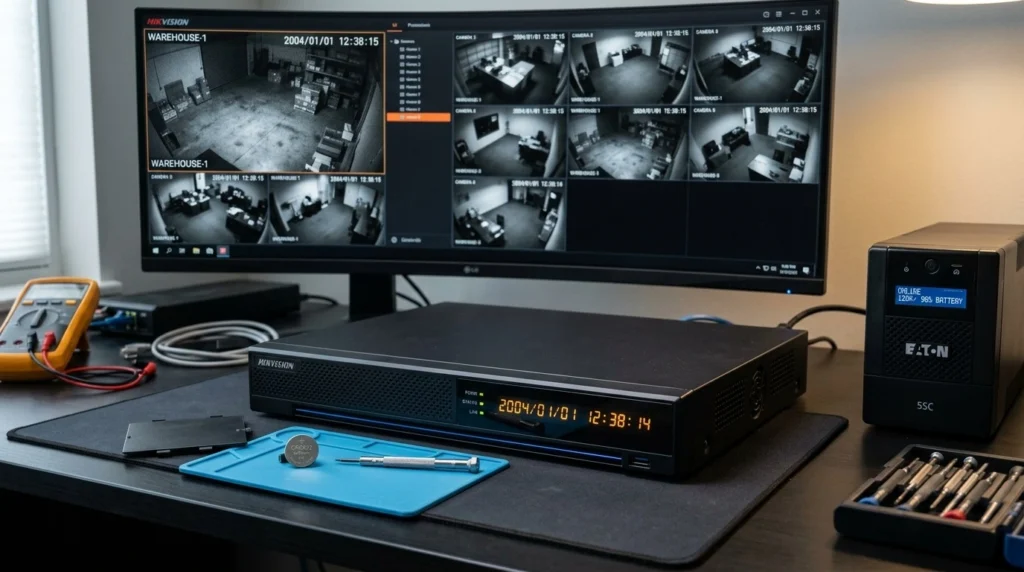
If your CCTV DVR or NVR resets to 2004 every time the electricity goes off, the most likely cause is a problem with the recorder’s internal real-time-clock (RTC) backup battery. Hikvision’s own support documentation confirms that a failed CMOS battery can cause a recorder to lose its date and time after power is removed. Hikvision’s explanation of CMOS-battery-related date resets
This does not necessarily mean your DVR or hard drive is damaged. In many cases, the practical fix is to replace the weak CMOS/RTC battery and provide the recorder with reliable backup power.
Why does my CCTV DVR reset to 2004 after a power outage?
The most likely reason is that the DVR’s internal CMOS/RTC battery is no longer retaining the date and time when the main power is disconnected. Hikvision specifically documents failed CMOS batteries as a cause of incorrect recorder dates, while real-world Hikvision users have reported recorders returning to 2004 after power interruptions. Hikvision support documentation on recorder date resets Real-world Hikvision 2004 reset case
A DVR has a real-time clock that needs to keep track of the date and time even when the main power supply is unavailable. A backup battery is used for this purpose in many electronic systems; when that battery becomes weak or fails, the clock may no longer retain its state during a power interruption. Technical explanation of an RTC backup battery during power interruption
The important point is that 2004 is not a universal default date for every DVR. Different recorder models can behave differently when their clock loses its retained time, which is why one system may display 2004 while another displays 1970 or another date.
What does the DVR’s internal CMOS battery actually do?
The CMOS/RTC battery provides backup power for the recorder’s real-time clock when the main power is switched off. Without adequate backup power, the recorder may lose the date and time it had stored before the outage. Schneider Electric’s explanation of RTC battery operation during power interruptions
The exact battery type depends on the recorder model. For example, Hikvision’s support article identifies a CR1220 battery for the recorder discussed in its documentation, while an IP CCTV Forum discussion identified a CR1220 in a particular Hikvision DS-7608NI-I2/8P NVR. Hikvision’s CR1220 guidance Hikvision NVR battery discussion
For that reason, do not assume that every DVR uses the same battery. The correct replacement should be confirmed from the recorder’s model documentation or by a qualified technician.
Why does it reset to 2004 instead of today’s date?
The year 2004 is a model-specific fallback behavior, not a standard date used by all CCTV recorders. A documented Hikvision user case describes an NVR that repeatedly forgot the date after power cuts and returned to 2004. IP CCTV Forum report of a Hikvision NVR returning to 2004
Another Hikvision discussion shows why the exact date should not be used as the diagnosis by itself: some affected recorders can show 1970, while the same underlying type of clock-retention problem can present differently on another model. Hikvision itself describes a recorder resetting to the 1970s as a CMOS-battery problem. Hikvision’s official CMOS battery diagnosis
So the useful diagnostic pattern is not simply “it says 2004.” It is:
The DVR keeps the correct time while powered → electricity goes off → DVR restarts → date/time has reverted to an old date.
That pattern strongly points toward the recorder’s time-retention system and warrants inspection of the RTC/CMOS battery.
Does a power outage damage the DVR or just cause the clock to reset?
A date reset by itself does not prove that the DVR’s hard drive has failed. If the recorder starts normally, displays the cameras, and continues recording, the immediate issue may be limited to its clock or time-retention system.
However, incorrect time can create a serious CCTV-management problem because recorded video is indexed according to the recorder’s time. A real-world Hikvision NVR user reported difficulty locating previously recorded footage after correcting an incorrect 2004 date, with the discussion pointing to synchronization between the NVR and cameras as a possible reason. IP CCTV Forum discussion about incorrect dates and missing recordings in playback
This means a homeowner should not simply ignore the problem because “the cameras are still recording.” The cameras may be recording, but the timestamps can make it much harder to locate the correct footage when an incident occurs.
Why does one DVR reset while another DVR keeps the correct date?
Different DVRs and NVRs can have different hardware, RTC batteries, firmware, and time-synchronization configurations. Therefore, two recorders connected to the same electrical supply can react differently to the same power interruption.
A real-world example: Noble Center
At Noble Center, our team investigated a situation involving two CCTV recorders.
One recorder was a Hikvision DVR connected to seven cameras. Whenever power went off and was restored, this Hikvision DVR would reset its date back to 2004.
There was also a second DVR connected to eight cameras. Unlike the Hikvision recorder, the second DVR retained its date and recordings after the power was restored.
The difference was important: the power outage itself was not enough to explain why only one recorder was losing its date.
Our diagnosis was CMOS battery failure/weakness in the Hikvision DVR. The CMOS battery was no longer properly retaining the recorder’s date and time when the main power was disconnected.
What was the recommended fix?
For the Noble Center system, the recommended solution was:
- Replace the CMOS battery in the Hikvision DVR.
- Connect the DVR to a UPS (Uninterruptible Power Supply).
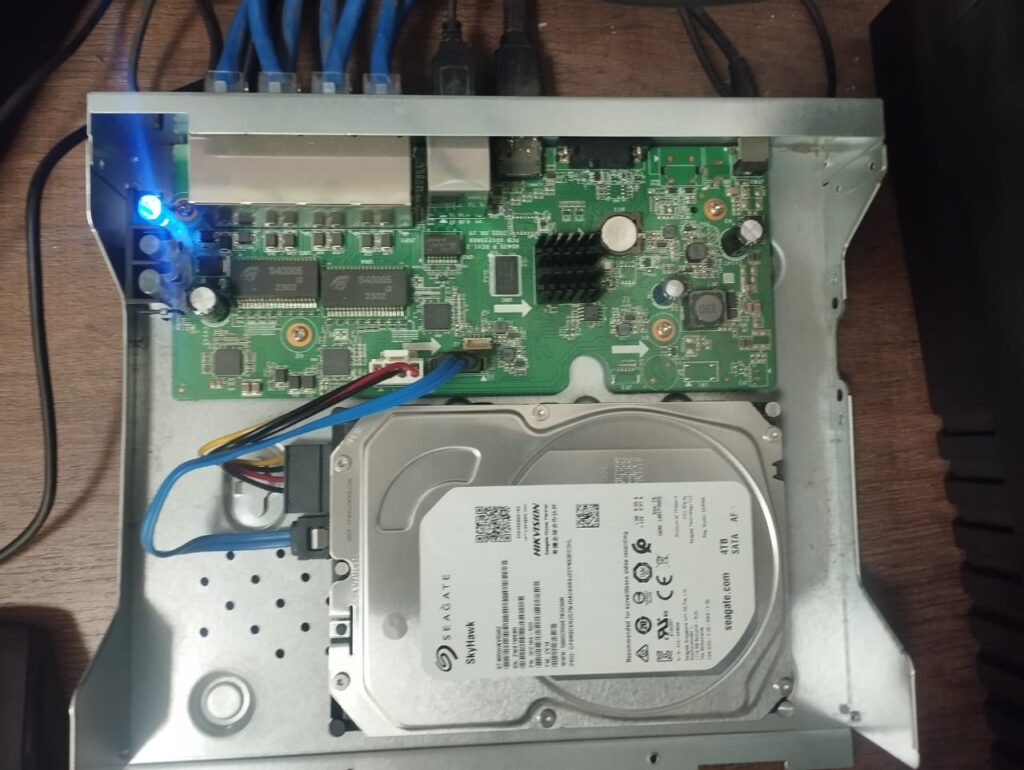
The battery replacement addresses the clock-retention problem, while the UPS provides backup power and reduces the effect of power interruptions on the recorder.
This is also consistent with real-world Hikvision/NVR troubleshooting discussions, where a recorder that repeatedly forgets its date after power cuts is associated with its internal button-cell battery, and a UPS is recommended where power interruptions are frequent. Hikvision NVR power-cut and battery discussion
What should I check if my DVR resets its date after every power outage?
Use the following symptoms as a starting point:
| What you observe | What it may indicate | What to investigate |
|---|---|---|
| DVR returns to 2004 after power loss | Clock-retention problem | CMOS/RTC battery |
| DVR returns to 1970 or another old date | Clock-retention problem | CMOS/RTC battery and recorder model |
| Date is correct until power is disconnected | Battery is not retaining time | RTC/CMOS system |
| DVR records but timestamps are wrong | Clock configuration problem | Date/time and synchronization |
| DVR corrects its time after connecting to the network | Network time synchronization | NTP configuration |
| DVR fails to boot or reports HDD errors | Potential separate hardware issue | Power supply, HDD and recorder diagnostics |
The table should be treated as a diagnostic guide rather than proof of a particular failure. Hikvision’s own documentation specifically attributes one class of incorrect-date behavior to a failed CMOS battery, while NVR troubleshooting cases show that firmware, configuration and other faults can sometimes produce related symptoms. Hikvision’s official battery diagnosis Hikvision NVR troubleshooting discussion
Can NTP fix a CCTV DVR that keeps losing its time?
NTP can allow a network-connected recorder to synchronize its clock with a network time source after it comes online. NIST explains that computers can automatically synchronize their system clocks periodically using Network Time Protocol (NTP) servers. NIST Internet Time Service and NTP information
But NTP should not be confused with the physical backup battery. If a DVR loses its time whenever its main power is disconnected because its RTC battery has failed, configuring NTP may correct the time after the recorder reconnects to the network, but it does not replace the failed battery.
For a professional CCTV installation, it is therefore sensible to consider both hardware clock retention and network time synchronization, where the recorder supports it.
Will the CCTV still record if the DVR date has reset to 2004?
The DVR may continue recording even though its displayed date is wrong, but the footage can be associated with an incorrect timestamp. That can make searching for footage by the actual date and time of an incident difficult.
For example, if an event happens today but the DVR believes the year is 2004, searching the recorder for today’s date may not produce the expected result. A Hikvision NVR troubleshooting discussion also illustrates how incorrect device/camera times can affect the visibility and organization of recordings during playback. Discussion of incorrect NVR time and recording playback
This is why a date-reset problem should be corrected rather than treated as a cosmetic issue.
How do I prevent my CCTV DVR from resetting after a power outage?
The first step is to have the recorder checked for a weak or failed CMOS/RTC battery and replace it with the correct battery specified for that model. Hikvision’s support documentation directly recommends replacing the CMOS battery for the recorder behavior it describes. Hikvision CMOS battery replacement guidance
The second step is to consider UPS protection, particularly where the property experiences frequent power interruptions. A UPS can keep the CCTV recorder powered during short interruptions and reduce abrupt power loss; CCTV professionals also recommend UPS protection for recorders installed in locations with frequent outages. IP CCTV Forum discussion of UPS protection for Hikvision NVRs
If the recorder has network connectivity, NTP synchronization can provide another layer of time management by allowing the device to obtain accurate time from a network time source. NIST information about NTP clock synchronization
When should I call a CCTV technician instead of replacing the DVR?
If the DVR works normally but repeatedly loses its date after every power interruption, do not assume that the entire recorder needs replacement. The first diagnostic step should be determining whether the problem is the RTC/CMOS battery, time configuration, NTP synchronization, firmware, power supply, or another hardware fault.
A technician can inspect the recorder and determine the appropriate battery and repair approach for that particular model. This is especially important because different CCTV recorders can use different battery configurations; Hikvision’s own documentation, for example, identifies a CR1220 for the recorder covered by its support article. Hikvision’s CR1220 documentation
In the Noble Center case, the diagnosis was CMOS battery failure/weakness rather than replacement of the entire CCTV system. The recommended fix was to replace the CMOS battery and connect the Hikvision DVR to a UPS.
CCTV maintenance and troubleshooting
Frequently Asked Questions
Why does my Hikvision DVR go back to 2004?
A Hikvision recorder that repeatedly returns to 2004 after power loss may have a problem retaining its real-time clock, commonly associated with a weak or failed CMOS/RTC battery. Hikvision officially documents failed CMOS batteries as a cause of incorrect recorder dates. Hikvision support: CMOS battery and incorrect recorder dates
Does replacing the DVR battery fix the date problem?
If the underlying problem is a failed or weak RTC/CMOS battery, replacing the correct battery can restore the recorder’s ability to retain its date and time during power interruptions. The battery type should be confirmed for the exact DVR/NVR model before replacement. Hikvision battery guidance
Will a power outage delete my CCTV recordings?
A wrong date after a power outage does not by itself prove that your recordings have been deleted, but incorrect timestamps can make recorded footage difficult to locate. The recorder, cameras, storage system and time synchronization should be checked if recordings appear to be missing. Hikvision NVR playback/time troubleshooting discussion
Can NTP stop my CCTV DVR from losing the correct time?
NTP can synchronize a network-connected recorder with a network time source, but it does not replace a failed internal RTC/CMOS battery. If the recorder loses its time whenever the main power is disconnected, the underlying battery or clock-retention problem should still be investigated. NIST information about NTP synchronization